Taking My AI Email Assistant Fully Local
Running a full email workflow on a laptop with a 12B local LLM and 17 tokens per second.

TL;DR: I rebuilt my AI email assistant to run entirely on my laptop. No cloud APIs, no subscriptions, and no email data leaving my machine. The system runs on Ollama using Mistral NeMo 12B for classification, summarization, and chat. MongoDB stores embeddings for semantic search. The entire stack costs $0/month to run. The real engineering challenge was making 17 tokens per second feel fast.
The Constraint That Changed the Design
The first version of my AI email assistant ran in the cloud. It worked well, but it had two problems:
- It required a Google Workspace account
- Every query burned API tokens
For the work email that made sense. Workspace provides enterprise security boundaries, Vault audit logs, and easy integration with services like Slack and Linear.
But for personal email, it felt excessive. Paying for Workspace just to access Vertex AI is like renting an office building to check your mailbox.
So I rebuilt the entire system to run locally on my MacBook Pro, eliminating the need for cloud APIs or subscription services. In this version, all email processing happens directly on the machine, and no message content is sent to external services.
The downside is that local inference is slower than cloud models. On my hardware, the model generates text at roughly 17 tokens per second, which quickly becomes the primary engineering constraint.
What Using It Feels Like
The system has two main components:
An automated triage pipeline that classifies incoming email.
A chatbot interface that lets me interact with my inbox in natural language.
A Classified Inbox
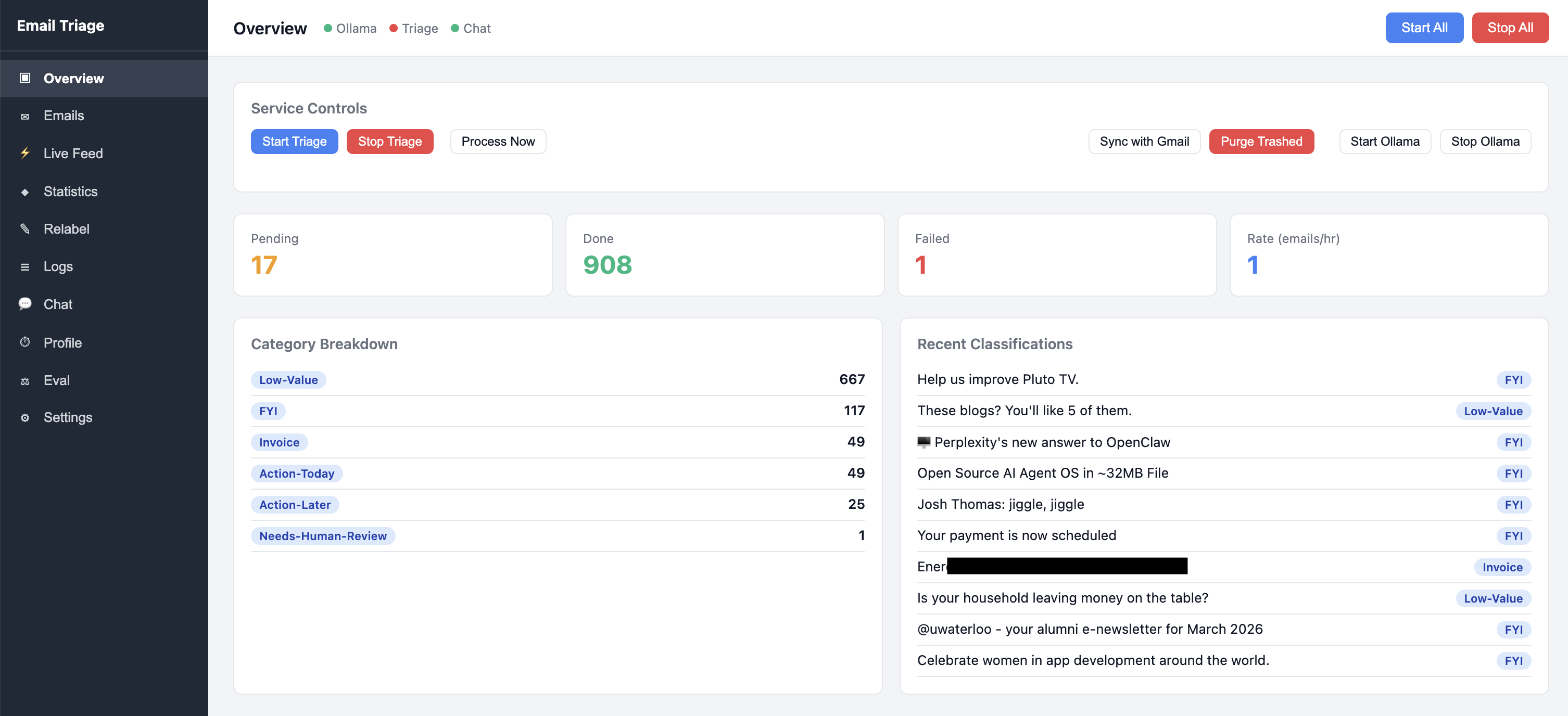
Every 10 minutes, a background daemon checks Gmail for new messages. Each message is sent to a local LLM for classification and labeled automatically.
The result is an inbox that already understands what every email is before I open it.
| Category | Description |
|---|---|
| Action‑Today | Deadlines within 48 hours |
| Action‑Later | Needs response, but not urgent |
| FYI | Informational updates |
| Low‑Value | Newsletters and promotions |
| Invoice | Bills or payment requests |
| Needs‑Human‑Review | Ambiguous messages |
Low‑priority messages are automatically archived. Important ones remain visible with clear labels.
Talking to My Inbox
The chatbot interface is where the system becomes more powerful.
Instead of manually searching Gmail, I ask questions like:
"Show emails from John last week"
or
"Find that email about the missing payment"
The web interface streams responses in real time. Tool executions show as step indicators, and results render as numbered markdown.
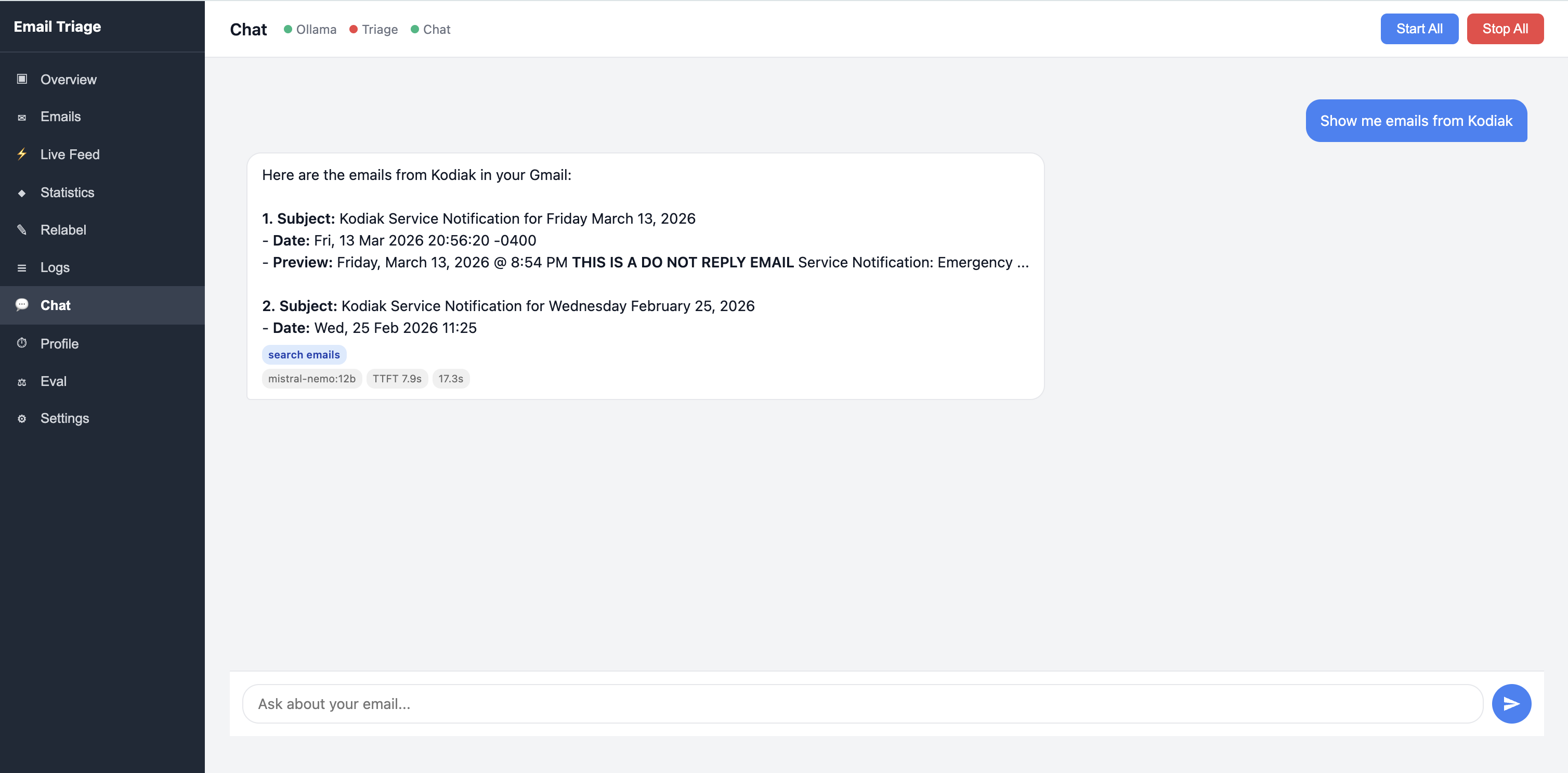
The system supports eight tools that the LLM can invoke:
| Tool | Description |
|---|---|
| search_emails | Gmail keyword search |
| read_email_thread | Retrieve a full thread |
| classify_email | Run triage classifier |
| get_inbox_summary | Inbox statistics |
| apply_label | Modify labels |
| semantic_search | Vector similarity search |
| send_reply | Draft a reply |
| delete_emails | Move threads to trash |
For simple queries, the system skips the LLM entirely and runs deterministic rules. These queries resolve in under a second.
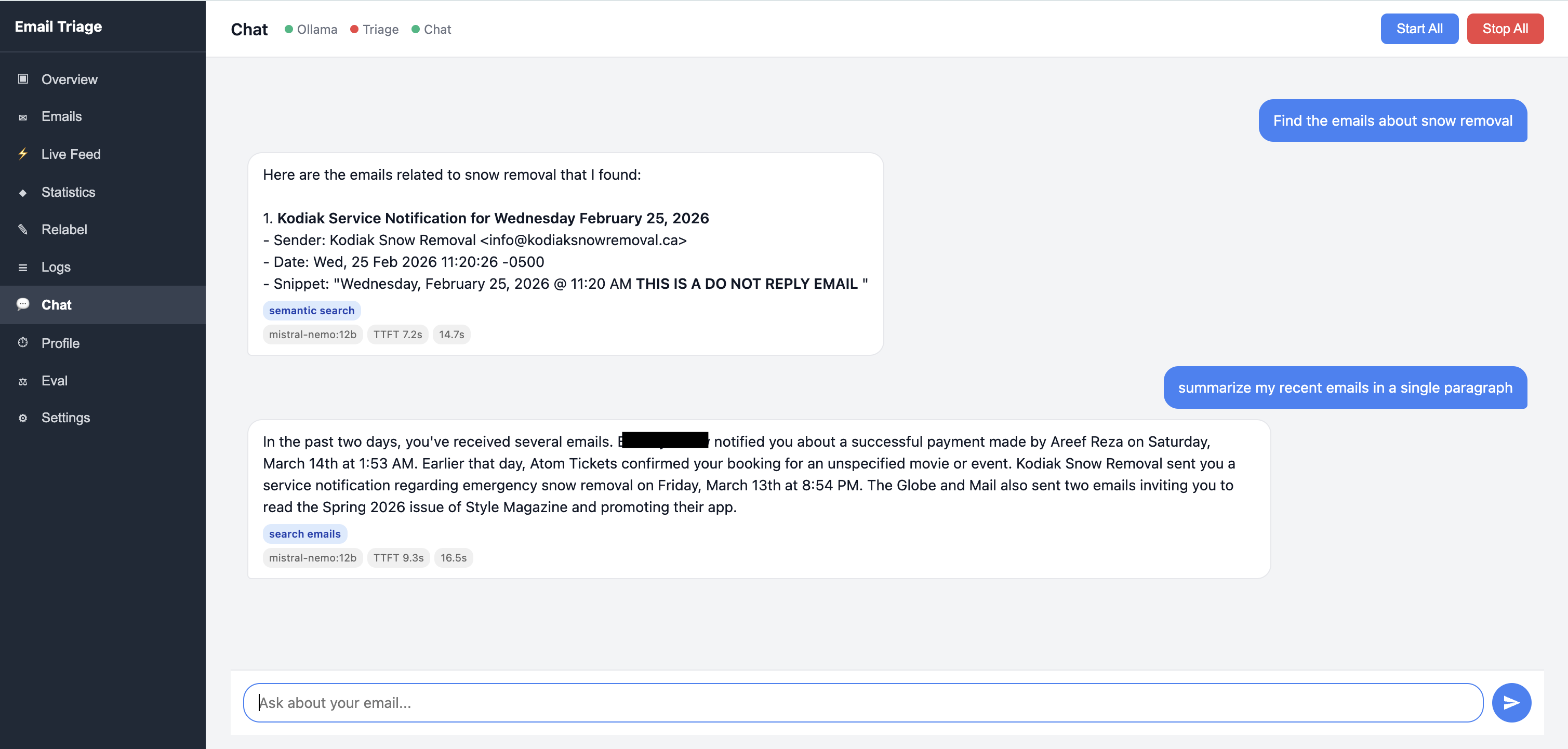
For vague queries, it performs semantic search using embeddings stored locally.
Semantic search finds relevant emails even when the exact words don't match. Each result includes a similarity score and a pre-computed summary.
Why Local AI Matters
Running AI locally has several practical benefits.
1. Zero recurring cost
Cloud APIs are cheap individually but accumulate over time. Running the model locally eliminates usage costs entirely.
2. Data never leaves your machine
No third‑party service ever processes your email content.
3. No API limits
The system works offline once emails are indexed.
4. No vendor dependency
Changes to pricing or API policies cannot break the system.
For sensitive personal data, this architecture often makes more sense than cloud services.
System Architecture
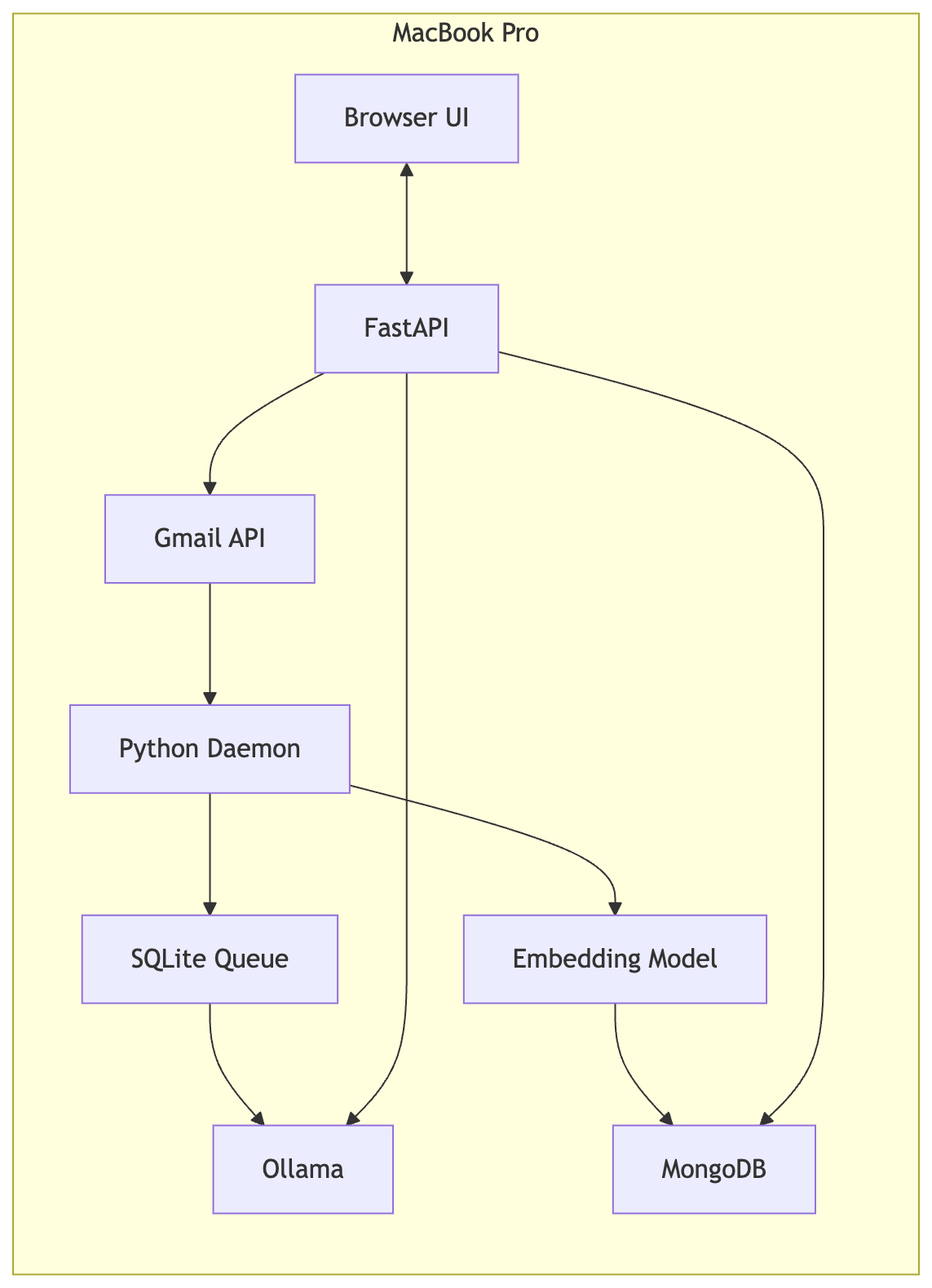
The entire system runs on a single machine.
The dashboard provides real-time visibility into the triage pipeline — classification activity, queue status, and processing metrics.
Pipeline overview:
Fetch new emails through the Gmail API.
Queue them in SQLite.
Classify each email using the local LLM.
Generate vector embeddings.
Store embeddings and summaries in MongoDB.
Provide a chat interface through FastAPI.
Raw email bodies remain in Gmail. Only embeddings and short summaries are stored locally.
The system runs as a background daemon, launched via personal-triage run or configured as a macOS launchd service for automatic startup.
Example Code
Classification builds a combined prompt and calls the Ollama REST API directly using httpx:
# classifier.py — EmailClassifier

def classify(self, email: EmailContext) -> ClassificationResult:
    system_prompt = build_system_prompt(
        vip_domains=self.vip_domains,
        is_vip_sender=is_vip_sender(email.sender, self.vip_domains),
    )
    user_prompt = build_user_prompt(email)
    prompt = f"SYSTEM:\n{system_prompt}\n\nUSER:\n{user_prompt}"

    raw_response = self._call_ollama(prompt)
    return self._parse_response(raw_response)

def _call_ollama(self, prompt: str) -> str:
    payload = {
        "model": self.model,
        "prompt": prompt,
        "stream": False,
        "format": "json",
        "keep_alive": self.keep_alive,
        "options": {
            "temperature": self.temperature,
            "num_predict": self.num_predict,
            "num_ctx": self.num_ctx,
        },
    }

    response = httpx.post(
        f"{self.host}/api/generate",
        json=payload,
        timeout=self.timeout,
    )
    response.raise_for_status()
    return response.json().get("response", "")
Vector search uses MongoDB Atlas Local's $vectorSearch aggregation stage. The pipeline over-requests and deduplicates to handle multi-chunk emails:
# semantic_search.py — SemanticSearch.search()

fetch_limit = k * 3  # Over-fetch to deduplicate multi-chunk emails
num_candidates = min(k * 30, 500)

pipeline = [
    {
        "$vectorSearch": {
            "index": "vector_index",
            "path": "embedding",
            "queryVector": query_embedding,
            "numCandidates": num_candidates,
            "limit": fetch_limit,
        }
    },
    {
        "$addFields": {
            "score": {"$meta": "vectorSearchScore"},
        }
    },
    {
        "$project": {
            "_id": 0,
            "gmail_id": 1,
            "date": 1,
            "from_domain": 1,
            "score": 1,
            "chunk_index": 1,
        }
    },
]

results = list(self.embedder.collection.aggregate(pipeline))
The Real Problem: 17 Tokens Per Second
Local models are slower than cloud APIs. On my machine, Mistral NeMo 12B (Q4) produces about 17 tokens per second during generation and processes input at roughly 127 tokens per second.
That gives a simple latency model:
latency ≈ input_tokens / 127 + output_tokens / 17.3 + overhead
The naive version of the chatbot took 30--60 seconds per query. Most of that time was spent generating tokens, so every optimization below targets either reducing the number of tokens generated or eliminating the LLM call entirely.
Measuring token speed on your own hardware
Every LLM call has two phases: prefill, where the model reads the entire input prompt in parallel, and generation, where it produces output tokens one at a time.
Ollama makes both easy to measure. Call the generate API with stream: false , and the JSON response includes timing for each phase:
curl http://localhost:11434/api/generate -d '{
  "model": "mistral-nemo:12b",
  "prompt": "Write 200 words about transformers.",
  "stream": false,
  "keep_alive": -1,
  "options": { "num_ctx": 4096 }
}'
prefill tokens/sec = prompt_eval_count / (prompt_eval_duration / 1e9)
generation tokens/sec = eval_count / (eval_duration / 1e9)
On my hardware, prefill runs at ~127 tokens/sec while generation runs at ~17 tokens/sec. The gap matters because a long prompt (tool schemas, conversation history) adds latency before the first token appears.
Eight Optimizations That Made It Usable
1. Intent router
A deterministic pattern matcher handles ~80% of queries without touching the LLM.
Example:
"show unread" → Gmail API search
This eliminates entire LLM calls.
2. Dual prompts
Routing prompts require more instruction than synthesis prompts.
Using smaller prompts for response formatting reduced token usage significantly.
3. Tool schema compression
Verbose tool descriptions were removed. Parameter names alone were enough for the model.
Token count dropped from ~1200 to ~500.
4. Conversation history trimming
Only the last five turns are included in the prompt.
This saves thousands of tokens per request.
5. Output token cap
Responses are limited to 150 tokens.
This prevents long generation times.
6. Model warming
The system sends a small request on startup to load the model into memory and keep it alive.
7. Pre‑computed summaries
Emails are summarized during ingestion.
At query time, the chatbot reads summaries instead of full email bodies.
This was the largest latency improvement.
8. Tool result limits
Search results are truncated to small snippets before being passed to the model.
After these optimizations:
Common queries respond in under 8 seconds
Complex queries respond in under 15 seconds
The built-in profiling tab tracks every stage of query processing — from intent routing through tool execution to LLM generation — making it easy to identify bottlenecks.
The Hallucination Problem
Speed was not the only challenge with running a smaller model. Accuracy was the other.
Large cloud models like GPT-5 or Gemini Pro tend to hallucinate less, but they can still fabricate details when asked to generate structured information without grounding. A 12B parameter model running locally is not as reliable. Early versions of the chatbot would confidently present email subjects, sender names, and dates that did not exist. The model would generate plausible-looking results instead of admitting it had no data.
This is a common trade-off when using smaller local models. Smaller models hallucinate more frequently, especially when asked to produce structured data like email fields. A user asking "show me emails from John" might receive a nicely formatted list of emails that John never sent.
How I Fixed It
The solution was to remove the model from the data path entirely for factual queries.
1. Deterministic intent routing. A regex-based pattern matcher handles ~80% of queries without calling the LLM at all. When you ask "show unread" or "emails from John", the system maps directly to a Gmail API call and formats the results in Python code. The model never touches the data, so it cannot fabricate it.
2. Confidence-gated LLM synthesis. Not every query is simple enough for pattern matching. Questions like "Do I have anything urgent?" require judgment. For these, the intent router still executes the search tool to retrieve real data, but marks the result as medium confidence and passes both the query and the tool results to the LLM for synthesis. The model interprets and summarizes real data rather than generating data from nothing.
3. Grounded formatting. Even when the LLM is bypassed, search results need to be presented clearly. A Python formatter renders tool results as numbered markdown directly from the API response. Every field shown to the user — subject, sender, date — comes from Gmail, not from the model.
The result is a system where the LLM is used for what it is good at (understanding intent, synthesizing information) and kept away from what it is bad at (reproducing exact data). Simple queries return in under a second with zero hallucination risk. Complex queries get real search results interpreted by the model, which is far more reliable than asking the model to recall or generate email data from scratch.
The Bigger Picture
The interesting part of this project is not the email assistant.
It is the pattern.
When AI models run locally, personal data becomes programmable. That is the shift I care about. Local models are not just a privacy upgrade or a way to save API costs. They make personal software practical again. If the workflow matters to you and the data already lives on your machine, you no longer need to wait for a product team to build it.


